Your own AI assistant: separate chats for family, work, and technical work
Think ChatGPT, but in channels you control: each conversation keeps its own context and does not spill into the others. We install and run OpenClaw on your server so your data is not tied to a generic account on someone else’s cloud.
What it can do (OpenClaw as your gateway)
OpenClaw is a self-hosted assistant that connects your channels and tools to a language model. Exact capabilities depend on what you connect; these are the requests we see most from technical individuals and small teams.
- Email triage and calendar-aware actions when you connect your providers.
- Messaging: WhatsApp, Telegram, Discord, and similar channels—with the assistant in the threads you define.
- Web research, scheduled reminders, and file handling in the workspace.
- Optional local models (for example via Ollama) when you want inference on your own hardware.
What this is, in plain English
It is an assistant that chats with you where you already work (Discord, for example). It can remember what you agreed in that channel, help you draft messages, summarize, or organize topics— and you choose what belongs in each place.
- Family: one channel for home topics or per person, so it does not mix with work.
- Business: separate channels for legal, finance, or marketing so the assistant does not blend one topic with another.
- Day to day: drafts, lists, reminders, or long-thread summaries in the channel you pick.
- Technical work: coding or infrastructure tasks in their own channels, with threads when a topic drags on.
Where your instance can run
We match deployment to who operates the server and how much control you want.
Managed VPS: we run the host, patching, and day-to-day operations.
BYO VPS: you bring the server; we install, harden, and align network access.
On-prem / personal server: hardware at your office or home with agreed networking.
Team / enterprise: multi-user rollout, stronger controls, and handoff documentation.
What we do when we set it up for you
You use the assistant; we make sure it is installed, connected, and secured.
Safety and trust (operator-grade)
Common patterns in serious OpenClaw-style deployments: crisp boundaries and secrets kept off the chat stream.
- A dedicated trust boundary per gateway instance—your environment stays isolated.
- A dedicated assistant number or channel (recommended) so boundaries are obvious to everyone.
- Allowlists for inbound messaging so only trusted sources reach the assistant.
- API keys and provider credentials live on the always-on host—not pasted into conversations.
Why we say "agents"
Here an "agent" is a conversation with its own memory: what you say in one channel does not pollute another. You can have one for a parent, one for a project, and one for the business.
- Personal and work stay separate: each channel is its own world.
- Several people can share the same server; each has their own channels and pace.
- You choose what is connected and what each place is allowed to do.
Real example: how we organize it
Our Discord has three blocks: tools and tasks, personal contacts, and the Blackrack business.
AGENTS
Channels by topic: home, health, coding, security, ops, language models, and more. Some are private so only the right people enter.
One channel per person: parents, siblings, friends—each conversation keeps its own context.
BLACKRACK
Channels such as finance, marketing, tech, legal, ops, and approvals—each one acting like an assistant for that role.
What it looks like in Discord
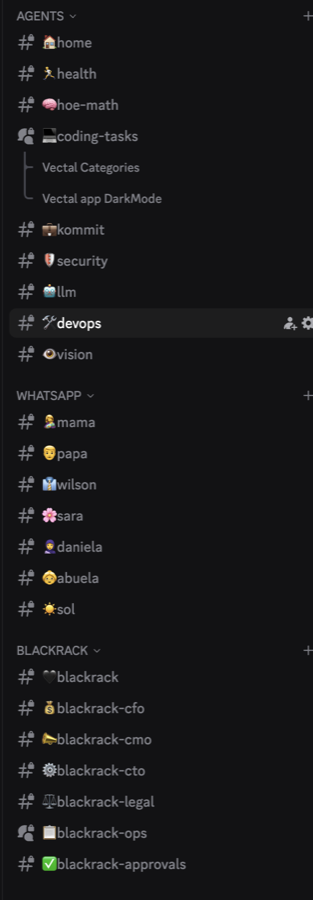
For a sharp image at larger size, export the screenshot at full resolution and replace apps/web/priv/static/images/image.png.
How we work with you
First conversation
What you want the assistant to help with, who is involved, and where you will chat (Discord or elsewhere).
Server
We prepare the server or use yours; we align network and access.
Install
We bring OpenClaw up and check configuration and storage.
Channels and testing
We connect your channels and test together that responses and permissions look right.
Handoff
We leave the essentials written down and optional ongoing support if you want it.
Pricing and what Blackrack covers
OpenClaw — Managed VPS plans start around $30/mo (Essential) and $80/mo (Growth); Scale & Enterprise is custom. Full detail on the pricing page. OpenClaw — Managed VPS plans start around $126.000 COP/mo (Essential) and $336.000 COP/mo (Growth); Scale & Enterprise is custom. Full detail on the pricing page.
Blackrack fees cover deployment and operations. LLM and cloud API usage (Anthropic, OpenAI, etc.) bills separately from those providers based on traffic; local models add hardware and power costs.
Frequently asked questions
What do I need to get started?
A VPS or server (or we provision one), DNS/domain if you publish services, and API keys for the cloud models you want—unless you stay on local models only.
Do I need my own API keys?
For cloud LLMs, usually yes—we store them securely on the server. Local models shift cost to hardware and electricity.
Can it run on my VPS?
Yes—both BYO and managed paths. We right-size resources for your channels, attachments, and models.
Can it use local models?
Yes, when the box has enough CPU/RAM; Ollama-style setups are a common path.
Is this for one person or a team?
Both—you can isolate context per channel or person; teams often add controls and documentation.
What support is included?
It depends on the managed plan (email, priority, SLA options on Scale & Enterprise). Details are on pricing and in the proposal we send.
What monthly costs are there besides Blackrack?
Infrastructure (VPS, storage, networking), model API usage, optional domain/email, and power if you are on-prem.
Want an assistant like this for your team or family?
Tell us what you would like the assistant to do and we will reply with clear next steps.
Talk to Blackrack